

How construction management software was successfully selected and implemented at Montclair State University is shared by Montclair State University and Projectmates.
Founded in 1908, Montclair State University is the second largest public institution of higher education in the US state of New Jersey and one of the leading comprehensive universities in the state and region. The main campus has 250 acres divided among the Township of Montclair in Essex County and the municipalities of Clifton and Little Falls in Passaic County.
An enrolment growth from 13,502 students in FY 2001 to 18,171 in FY 2010 necessitated an expansion and improvement of the campus’ physical assets, including new construction, modernisation and renovation of existing buildings, campus-wide utility and infrastructure upgrades, and completion of life and safety compliance projects.
Project managers relied on spreadsheets, databases and emails to track projects and to provide information to stakeholders. This left the university vulnerable to fragmented project files, business inefficiencies and a non-formalised workflow.
With high profile projects such as the Centre for Environmental and Life Sciences, a new School of Business and dozens of smaller construction and renovation projects in the planning stages, the university began to investigate electronic solutions through which it would have the ability to formalise its workflow across the business unit, provide a single point of reference for all stakeholders, improve the transparency and visibility of data, and serve as a secure repository for all documents.
The goal was to simplify the construction management process with the aid of a web-based tool in which the university would manage the full spectrum of project work from an owner’s perspective, including budget controls, schedules, contracts, reporting, submittals, communications, and document management; and then function as a complete archive upon project closeout.
SOFTWARE SELECTION PROCESS
A core team was assembled from within the divisions of facilities and finance to map out existing work processes. This team operated with critical input and participation from budget and planning personnel, and began the process of memorialising the workflow of a capital project from initiation through to completion.
The project team was well aware that in a future campus-wide ERP upgrade, core components of a new system, including budget and finance information, would either be pushed from or synchronised to the system from the university’s areas of accountability. Project planning was adjusted accordingly to allow ERP integration to be recognised as a delayed, post-implementation milestone. Workflow exercises were allowed to move forward, while remaining fully cognisant of the projected ERP targets.
With workflow documentation in progress, team members sought third-party assistance with software selection criteria, identifying industry best practices, and reviewing potential solutions. A consultant was engaged and, through the use of interviews with internal system users, an extensive list of system business requirements was generated, with the university’s division of information technology providing the data for the technical requirements.
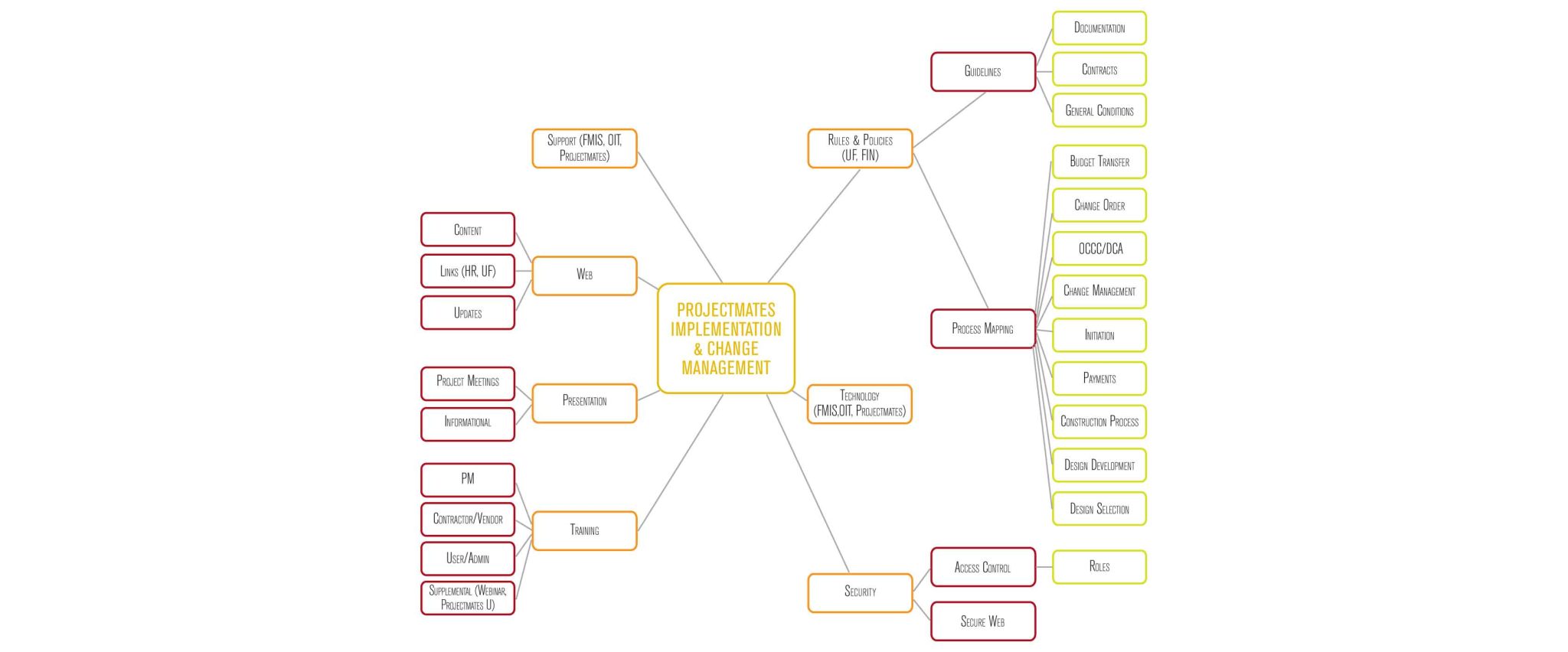
The project team regularly met with the university’s human resources organisational development group in order to effectively map and follow specific change management processes. These sessions planned and directed the building of required knowledge within the project management team, and led the direction of issue-tracking, support services
After a thorough review of numerous software systems the team selected Projectmates by Systemates, and the building of a customised web portal. Implementing the software took only six months from project kick-off through to configuration, training and ‘go live’ in February 2013.
KNOWLEDGE BUILDING AND SUPPORT
In order to initiate knowledge building and support efforts, a live project was set up in Projectmates to track and manage the actual implementation of the software. The team stored and shared implementation and training documents within the system, managed the implementation schedule, generated weekly meeting minutes and assigned to-do items to specific people. This process not only met a need for project transparency, but also familiarised the department with the software early on.
The software was deployed using virtual machines, providing a lower cost and greener IT footprint than physical servers. After a short period of initial configuration, which included integrating campus-wide log-ins into the system, core employees were able to immediately access the system and begin training. At this point, the implementation could evolve organically with user feedback, as additional internal users were brought onto the system.
Throughout the implementation, security was of paramount importance due to the inclusion of external users as one of the intended purposes for the software. Numerous user roles were configured – both for internal and external users – allowing the university to ensure that project information, documents and financials were secure from tampering, whether accidental or malicious. Role assignments included restrictions based upon user-level and file type, and the mandatory use of secure HTTP for all portal traffic. The software’s security was further refined to exclude irrelevant or extraneous information from being displayed, providing a simpler, cleaner interface for user navigation.
FUTURE LEVERAGE
Today, the university hosts and manages its construction project management application on-site, allowing for total self-operational control and ownership of the system. Future expectations include leveraging Projectmates to manage the capture of detailed asset and systems information collected during design and construction for later inclusion in CMMS (customer maintenance management systems) and BIM (building information management) systems. There is also an opportunity to use the system to generate on-demand and scheduled project reports, and use real-time metrics to manage project and portfolio performance.
FOUR LESSONS LEARNED
- Creating and understanding the multi-departmental business workflow was of great value to this project. Specific bottlenecks and duplicative activities in the existing operations were revealed and discussed ahead of the implementation, which allowed for process reviews and updates that created efficiencies, and streamlined project workflows. Certain business process opportunities were identified and tabled to take advantage of future ERP capabilities. Facilities personnel continue to meet regularly with managerial and administrative staff, in order to review and refine processes in the software.
- Outside help can be beneficial. In addition to seeking assistance with software selection guidance and identifying opportunities for business process improvements, the university engaged a consultant with construction management expertise to ensure that higher education and construction issues were addressed and to help users acclimatise to the evolving external environment.
- Find the solution that best fits the needs of the organisation. The configurability of the chosen software not only allowed the facilities division to satisfy its immediate need to go live with a software solution while integrating with the university’s identified ERP in the future, it also provided opportunities for ongoing business growth without succumbing to the trap of initially purchasing ‘too much’ software to satisfy current operational requirements.
- Keep up the momentum post ‘go live’. Upfront and ongoing training opportunities to support internal project managers and external contractors and architects were delivered through on-site, distance learning and webinar training sessions. The university continues to provide ongoing training to the various user groups through the efforts of internal system administrators and key departmental ‘super users’.
Written by Jonathan Lee, director of facilities management information systems at Montclair State University; Kaely Culbertson, implementation and support specialist at Projectmates (Systemates Inc); Yolanda Brandon, executive assistant to the vice president of university facilities at Montclair State University; and Daniel Gilmartin, FMIS network administrator for the facilities management information systems department at Montclair State University.


